Proxy > Gmail Facebook Yahoo!

Oracle Solaris Goes to 11


solarisOracle has updated its Unix-based operating system Solaris, adding some features that would make the OS more suitable for running cloud deployments, as well as integrating it more tightly with other Oracle products, the company announced Wednesday.
Similar Articles:
"We looked at some of the big challenges that people were having in deploying cloud infrastructure, either in a private cloud or public cloud," said Charlie Boyle, senior director of product marketing. "In the release, we engineered out some of the complexity in managing a cloud infrastructure, and made it possible to run any Solaris application in a cloud environment."
Cloud deployments require even greater levels of automation and streamlining than a standard IT infrastructure would, noted Markus Flierl, Oracle vice president of software development. While an organization may run hundreds of Solaris servers, as it moves its applications to a cloud infrastructure, it may run them across thousands of virtual Solaris instances.
Solaris, a Unix implementation, was originally developed by Sun Microsystems, which Oracle acquired last year. While not as widely known for its cloud software, Oracle has been marketing Solaris as a cloud-friendly OS. In Oracle's architecture, users can set up different partitions, called Zones, inside a Solaris implementation, which would allow different workloads to run simultaneously, each within their own environment, on a single machine.
Oracle Solaris Zones has 15 times less overhead than a VMware implementation, Oracle asserted in its marketing literature. The company also touted that Zones had no artificial limitations set on memory, network, CPU or storage resources.
Many of the new features were designed to ease the administrative overhead of running a cloud-like infrastructure, Flierl said. One new feature, called Fast Reboot, will allow the system to boot up without doing the routine set of hardware checks, a move that can make system boot times up to two-and-a-half times faster, Oracle claimed. This feature can be handy in that an administrator applying a patch or software update across thousands of Solaris deployments can reboot them all the more quickly. "It allows you safely to upgrade your entire environment," Flierl said.
The new Solaris also features a new software management system, called Image Packaging System, that will keep track of a program's dependencies, or the libraries and other software that the program needs to run. The Image Packaging System keeps all the software packages in a system up-to-date, including those in a virtual environment.
Also adding to Solaris' cloud capabilities are new administrator controls that lock down the settings in individual Zones. Users can be limited in what changes they can make to the file system, or to the network settings. It can also limit the amount of network bandwidth each Zone can use. This is also the first version of the OS that allows users to virtualize networking resources, meaning supporting network cards can route traffic to appropriate virtual machines without any additional processing on the part of the server CPU itself.
In addition to work Oracle has done to make Solaris cloud-ready, the company has also closely tailored other Oracle products so that they can be coupled more easily to Solaris, including the Oracle Database 11g, Oracle Fusion Middleware 11g and the Oracle Enterprise Manager Ops Center administrative software package. By controlling an entire stack of software, the company can make "holistic" decisions over which part of the stack would be best suited to tweak to gain performance improvements, Flierl said.
Solaris 11, which complies to the Open Group's specifications for Unix implementations, can support any programs that were written for earlier versions of Solaris, dating back to Solaris 6. The company also runs the Oracle Solaris Binary Application Guarantee Program, which certifies more than 11,000 applications that can run on Solaris 6.
Solaris 11, released Wednesday, will run on both x86 and Oracle's Sparc-based processors.
[Read More...]


Android is most attacked mobile platform, research


Android is most attacked mobile platform, research According to a new research by security firm, McAfee, Google's Android mobile OS was the most attacked mobile platform in the second quarter of the year.
The attacks on the open source platform rose 76 per cent in the quarter, which is presumably due to the ever increasing popularity of the platform and high sales of Android powered devices.
The open source nature of the platform allows developers to access framework API's used by the core Android team and also copy and improve upon certain components without starting from scratch. The same open source nature also poses problems related to malware as attackers access information about the platform and design more sophisticated malware.
The malware attackers also exploit the fact the Google's screening process for Android Marketplace is not as strict and rigid as that of the Apple App Store team. This allows anyone to upload any app on the store and start targeting users.
Experts suggest that Google should either introduce more stringent rules or it can launch a new App store with safer environment much like the Amazon App Store that offers only safe Android apps to the users in the US.
[Read More...]


Google Unveils Ice Cream Sandwich


After much anticipation and speculation, the world finally gets to see Google's new operating system Ice Cream Sandwich. This is the first major launch from Google after it announced the acquisition of Motorola Mobility. Android 4.0, the latest update to the search giant's Android mobile platform, is designed to combine software used in tablets and smartphones.

The new operating system merges Android's tablet OS (version 3.0, aka Honeycomb) with the platform’s smartphone OS (version 2.3, aka Gingerbread). Ice Cream Sandwich is not an incremental update, but a complete OS makeover. Some of the changes that the new OS brings include the elimination of physical navigation buttons and creation of an entirely new font, 'Roboto' for user interface menus.

samsung, Nexus prime, Galaxy Nexus, Ice Cream sandwich, Android operating system, Google, iOS Platform, Native screenshot support, Facial Recognitioon in ice Cream Sandwich, Android Honeycomb, Andorid Gingerbread, New Android                                         
Speaking on the launch at Google's press conference in Hong Kong on Wednesday morning, Android head honcho Andy Rubin shared, “We want to go beyond smart. We took all of the innovation that’s available at Google, and put it into developing this phone.”

Ice Cream Sandwich brings a host of improvements to Google’s proprietary applications, including incognito browsing and Chrome bookmark syncing on your mobile phone. It also brings along an improved Gmail app that boasts better auto-completion of e-mail body text, auto-programmed quick responses for when users are busy, and nested e-mail sub-folders for easier organisation.

Another striking feature of Ice Cream Sandwich is 'Android Beam'. It is a new feature for Near Field Communications (NFC) technology found in a handful of Android handsets. With this feature, the Galaxy Nexus smartphone users can share content between their phones, simply by tapping the devices together.

Google also debuted Face Unlock--an exciting OS feature for enhanced security. The new OS uses facial recognition technology to recognise whether a phone's owner is actually holding the phone. 
[Read More...]


Scientists claim viruses may cause up to 40pc of cancers


 Scientists claim viruses may cause up to 40pc of cancers London, Oct 17 : Viruses may be behind up to 40 per cent of cancers including brain tumours and leukaemia, according to scientists.
If they are proved correct in further tests, it could pave the way for vaccinations against several types of cancer and therapies to cure them, the Daily Mail reported.
The claim is based on a study that has discovered viruses in types of cancer, which were never thought to be linked with infection.
It has been known for decades that viruses cause some types of cancer but it was thought to be only 10 to 20 per cent of cases.
The best known are the hepatitis B and C bugs, which can cause liver cancer, and the human papilloma virus (HPV) which can cause cervical cancer.
Now, scientists at the Karolinska Institute in Sweden have found a viral link with medulloblastoma, the most common form of childhood brain tumour.
Two years ago it was discovered that Merkel cell carcinoma, an aggressive skin cancer, often follows infection by the polyomavirus that is common among animals and can spread to humans.
It is also claimed that viruses could cause prostate cancers.
Nobel Prize winner Harald zur Hausen, who jointly discovered the link between cervical cancer and HPV in the 1980s, said he expected more discoveries to follow and suggested that viruses could be involved in cancer of the skin, breast, gut and lungs.
“If we can understand how these viruses work we could prevent people from contracting them and even create therapies that use the patient’s own immune system to destroy infected or cancerous cells,” said Alan Rickinson, professor of cancer studies at Birmingham University.
[Read More...]


NASA’s first humanoid robot ‘turned on’ in space


 NASA’s first humanoid robot ‘turned on’ in spaceLondon, August 23: In a bid to help the astronauts in space, NASA researchers have developed a humanoid robot.
Ground controllers turned on the Robonaut - the first humanoid robot in space - for the first time since it was delivered to the International Space Station in February.
The test involved sending power to all of Robonaut's systems, though the robot was not commanded to move, that will happen next week.
And in keeping with current trends, Robonaut even has his own Twitter page.
"Those electrons feel GOOD! One small step for man, one giant leap for tinman kind," the Daily Mail quoted Robonaut as tweeting.
"Sure wish I could move my head and look around," Robonaut added.
Even, the deputy project manager Nicolaus Radford is very excited with the progress.
"It was just very exciting. It's been a long time coming to get this thing turned on," he said.
The robot was delivered on space shuttle Discovery's final flight. On September 1, controllers will command Robonaut to move its fingers, hands and arms.
For now, Robonaut - also called R2 - is designed to stay inside the space station. Future versions might venture out on spacewalks, saving astronauts time while keeping them safe. (ANI)
[Read More...]


NASA releases new images of Apollo’s moon landing site


.

NASA releases new images of Apollo’s moon landing site American space agency has released a set of impressive new photos of the Apollo landing sites on the Moon.
The images taken by the robotic Lunar Reconnaissance Orbiter (LRO), clearly shows hardware parts left over by the astronauts in the 1960s and 70s. Several probes have send pictures before but these are the best yet.
LRO has been circling the moon since 2009 to gather more information bout the natural satellite. It recently lowered its lunar orbit from 50km above the Moon's surface to just 25km. As the LRO moved closer, it was able to send much clearer pictures of the landing sites.
The focus of the latest release was Apollo 17, 14 and 12 sites. These images were captured by the narrow-angle imaging system on LRO's Lunar Reconnaissance Orbiter Camera (LROC) instrument. It is capable of seeing objects at a resolution of 25cm by 25cm per pixel from a low altitude.
The probe, which was originally conceived as a robotic precursor to future manned missions, has been a highly productive mission having sent several hundred thousands pictures of the lunar surface in great clarity.
[Read More...]


Soon, computers to tell your intensity of pain


Soon, computers to tell your intensity of painWashington, Sept 14 : The need for a better way to objectively measure the presence or absence of pain instead of relying on patient self-reporting has long been an elusive goal in medicine.
But now, using advances in neuroimaging techniques, researchers including one of Indian-origin from the Stanford University School of Medicine trained a computer algorithm to interpret magnetic resonance imaging (MRI) data of the brain and determine whether someone is in pain.
Researchers took eight subjects, and put them in the brain-scanning machine. A heat probe was then applied to their forearms, causing moderate pain. The brain patterns both with and without pain were then recorded and interpreted by advanced computer algorithms to create a model of what pain looks like. The process was repeated with a second group of eight subjects.
The idea was to train a linear support vector machine - a computer algorithm invented in 1995 - on one set of individuals, and then use that computer model to accurately classify pain in a completely new set of individuals.
The computer was then asked to consider the brain scans of eight new subjects and determine whether they had thermal pain.
"We asked the computer to come up with what it thinks pain looks like," said Neil Chatterjee, currently a MD/PhD student at Northwestern University.
"Then we could measure how well the computer did." And it did amazingly well. The computer was successful 81 percent of the time.
The study was recently published in the online journal PLoS ONE. (ANI)
[Read More...]


New smart phones with ultra fast 4G wireless broadband are making headlines this week, mainly Sprint’s slick HTC EVO 4G handset. But laptop manufacturers are receiving in on the 4G action too.
Lenovo ThinkPad laptops in the U.S. will currently support Sprint 3G and 4G (WiMax) wireless, the companies announced today. ThinkPad models are by now 3G-ready, and Lenovo will now offer 4G-enabled laptops like the business-oriented ThinkPad Edge.
Clearwire, the WiMax carrier backed by Sprint, says extra than 30 computers now come with a 4G modem that works with its network.
In linked news, Qualcomm today announced that its newest Gobi modem chipsets would support LTE (Long Term Evolution), a challenging 4G technology favored by leading U.S. wireless carriers AT&T and Verizon Wireless.
Major laptop makers, as well as Acer, HP, Dell, and Lenovo, already offer Gobi 3G modems, and the progression to 4G should happen soon.
Muddled 4G
User uncertainty may slow the adoption of 4G broadband in laptops, though. In the U.S. market, two next-generation wireless broadband technologies–WiMax and LTE– are “4G.” Life would be many simpler with one global spec for high-speed mobile broadband, a goal advocated by not any other than Clearwire chief manager Bill Morrow, Reuter’s reports.
What’s so confusing? Here’s an instance: Lenovo’s ThinkPads support Sprint 4G, which uses WiMax. A 4G-enabled Dell laptop with a Qualcomm Gobi modem will hold up LTE, a nascent technology that AT&T and Verizon Wireless plan to roll out over the next two years. However, several Dell laptops, as well as the Inspiron Mini 10 netbook, offer WiMax 4G modems also.
4G 101
Of course, if you’re buying a 4G-ready laptop from your wireless supplier, the problem is solved. The carrier would certainly sell merely 4G laptops that are compatible with its service. But lots of home and business clients are used to buying laptops directly from PC manufacturers or client electronics retailers. For the latter group, a 4G collide course is essential.
There’s plenty of time for home and business users to learn up on the finer points of LTE vs. WiMax, though. Both 4G networks are in their premature stages of build-out, although WiMax has an important head start. Sprint has rolled out its 4G service in 27 U.S. cities, and plans to add 15 more this year. But mainly AT&T and Verizon Wireless users won’t see 4G accesses waiting sometime next year.
[Read More...]


ISRO launches PSLV-C18, places weather satellite in orbit


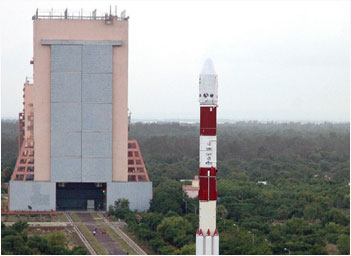
PSLV-C18INDIAN Space Research Organization (ISRO) successfully placed Indo-French satellite Megha Tropiques and three nano satellites in orbit with the launch of PSLV-C18 rocket from Sriharikota this morning.
The three nano satellites are VesselSat1-1 from Luxembourg, SRMSat from SRM University, Chennai, and Jugnu from IIT, Kanpur
 The Indo-French satellite Megha-Tropiques placed in orbit as part of a key mission will help understand global tropical weather, ISRO said.
All four satellites were injected into orbit one after another in clockwork precision about 26 minutes after PSLV lifted off  at 11 am.
ISRO chairman K. Radhakrishnan described the mission as ‘a grand success.’
Speaking to scientists after the launch, he said: “PSLV—C18 has been a grand success. Very precisely, four satellites were injected in space orbit and the difference between what we planned and what we achieved is just two km over an altitude of 867 km.
News reports said the rocket first injected the 1000-kg Megha-Tropiques satellite into an orbit of 867 km altitude at an inclination of 20 degrees with respect to the equator.
Megha-Tropiques carries three payloads — two by French space agency CNES (Centre National d’Etudes Spatiales) and one jointly by ISRO and CNES — and a complementary scientific instrument. ISRO has built the satellite at a cost of Rs. 80 crore with “equal contribution” from CNES, reports added.
Megha-Tropiques (Megha meaning cloud in Sanskrit and Tropiques denoting tropics in French) will investigate the contribution of water cycle in the tropical atmosphere to climate dynamics. Data from the weather satellite will benefit all countries in the Indian Ocean region.
[Read More...]


PC chip that saves energy, is 60% faster


Indian-American Raj Dutt, an IIT-Kharagpur alumnus, has developed a next-generation energy-efficient computer chip.
WASHINGTON: Indian-American Raj Dutt, an IIT-Kharagpur alumnus, has developed a next-generation energy-efficient computer chip that has caught the attention of the Pentagon, which is testing its application in the ambitious F-35 Joint Strike Fighters.

The breakthrough technology by Dutt, chairman and CEO of privately-held APIC Corp and Photonic Corp, helps computer processors consume up to 90% less energy and run up to 60% faster. "The significance of the technology is that information transfer on the semiconductor chip as well as between components, will now be done using light - photons - instead of just electrons (electronics )," Dutt said.

There are many advantages in size, weight and especially power consumed, he explained during his recent trip to Washington. Photons do not generate heat, thus they do not need to be cooled. For electronics, cooling is one of the largest cost components.

"Photonic interconnects do not generate heat and use less size than electronic copper interconnects, so more transistors can be put onto a chip. Most significantly, we have figured out how to do this using the same economical process used in manufacturing semiconductor chips today , enabling them to be stamped out by the millions," Dutt said.

Well aware with the potential of the computer chip, the US department of defence is fully supporting Dutt and his company. The Pentagon is testing the chip's application in the ambitious F-35 Joint Strike Fighters.

There are several benefits to the computer and defence industry, Dutt said. "First, for military platforms there are tremendous savings in size, weight and power required, while it simultaneously brings much more capability in bandwidth, processing power and speed," he said.

Now, tens or even hundreds of separate signals (frequencies ) can be passed through a single fiber optic cable less than a 10th of the diameter of a human hair, rather than one signal through a copper cable, he said. 
[Read More...]


Difference Between Optical Zoom and Megapixel


 Optical Zoom vs Megapixel

Optical zoom and megapixels are two widely discussed aspects of cameras and photography. This article will try to compare these two aspects to find out what they are in general. Later the difference between optical zoom and megapixel is discussed.
What is Optical Zoom?
In photography, the photographer is constantly exposed to conditions where he must take the photograph standing very far from the subject. It can be a wildlife scene or a faraway waterfall, which are impossible to get near, or even a shot where the subject will be disturbed by the presence of the photographer. The photographer requires a zooming method to take the snapshot with enough details on it. All cameras use a set of lenses to control the light that falls on the sensor or the film. In some cameras, there is a mechanism to adjust the set of lenses so that a faraway object can be zoomed in and a clear photograph can be taken. Some cases require for the photo to be of a wide angle, in that case the system can be zoomed out to fit in the image. This method of zooming in and out using mechanical methods to move the lenses is called optical zooming. Normally in a camera a zoom button has two ends, w and t. w stands for wide angle and t stands for telephoto. It must be noticed that when an image is zoomed in and out from the normal position of the lens, the image appears distorted. The center part or the outer parts depending on the zoom setting is stretched. Optical zoom, however, does not have much of an impact on image quality.
What is Megapixel?
Every camera has a sensor. In a film based camera, the sensor is the film itself. In a digital camera, electronic sensors such as CCD (charged coupled devices) and CMOS (complementary metal oxide semiconductor) are used as the sensor unit. A sensor consists of millions of photo sensitive electronic components. These components are placed on a plate as a two dimensional matrix to build the sensor. A single element is compatible to a pixel in the resulting photograph. Therefore, the number of pixels in the photograph is equal to the number of sensitive elements on the sensor. The megapixel value of the sensor is the number of sensitive elements on the sensor in millions. This directly corresponds to the size of the photograph. The megapixel value is also known as the resolution of the sensor. This directly determines the largest enlargement possible for a photograph. The amount of details that can be seen in the photograph is determined by the resolution of the photograph.
What is the difference between Megapixel and Optical Zoom?
• Both the optical zoom and megapixel determines the quality of the photograph.
• The optical zoom is a variable property, but the resolution is a fixed value for the sensor.
• Optical zoom is achieved by changing the distance between the lenses using a mechanical system. Resolution only depends on the sensor settings.
[Read More...]


CONTROL YOUR COMPUTER FROM CELL PHONE FOR FREE


EDIT: This method will no longer work soon due to the kwiry service closing down. More information here.

You heard the forecast this morning, but totally forgot to turnoff your computer this morning; You’re on vacation, and need to get your computer running a backup, just in case. But in both scenarios, you don’t have access to your computer. In this video, I show you how to setup a solution, that will allow you to run any predetermined command, with a simple Text message.

You’ll need Microsoft Office, or just Microsoft Outlook (any version will do), and a working internet connection. In this tutorial, we will be using gmail.com for a free email account, and although you can use your own, I like to keep my texts and emails seperate. And we will be using a free service, at kwiry.com that allows you to send text messages to them, and they send it to you as an email.

1. Goto gmail.com to sign up for a free email account, and copy down the new email you have.
2. Goto kwiry.com and sign up with your new e-mail address.
3. Open up Microsoft Outlook and create a new account.
1. If this isn’t your first time to setup an account, you can click on “Tools” and then “Accounts” to set up a new account.
4. On the First page, fill in “Your Name:”, “E-mail Address:”, “Password:”, and “Retype Password”, and then click the box at the bottom that says “Manually configure serer settings or additional server types”
5. Click “Next”
1. Leave the “Account Type” unchanged. It should be POP3. If not, change it to that.
2. Set “Incoming mail server:” to “pop.gmail.com”
3. Set “Outgoing mail server (SMTP):” to “smtp.gmail.com”
4. Set “User Name:” to your user name that you chose for your e-mail account.
5. Click “More Settings”
1. Click “Advanced”
2. Change the Port on “Incoming server (POP3):” from “110″ to “995″ and click the check box that says “This server requires an encrypted connection (SSL)”
3. Click “Outgoing Server”
4. Check the box that says “My outgoing server (SMTP) requires authentication” and choose “Use same settings as my incoming mail server” if it is not already checked.
5. Click “OK” and test the settings by clicking on “Test Account Settings …”
6. If all is well, click “Next” followed by “Finish”
6. Return to your Desktop
7. Open up My Computer
8. Open up “Local Disk (C:)” — may be different for you.
9. Create a folder called “commands” and open it.
10. Right-Click and create a new text document called “shutdown.bat” and click Yes when it asks about the extension change. Now open the document.
11. Right Click on the newly created shutdown.bat and click “Edit”
12. Type in “shutdown.exe -s -t 5″ and Press Ctrl + S to automatically save the file.
13. Open Outlook back up and click on Tools followed by Rules and Alerts…
14. Click “New Rule…”
15. Near the bottom, under “Start from a blank rule”, click “Check messages when they arrive”
16. Check the box that says “with specific words in the subject” followed by clicking on “Specific Words“ in the bottom of the window.
17. Add the subject title, which was “your kwiry – Shutdown” and click “Add”, followed by “OK”
18. Click “Next”
19. Check the box that says “start application“ followed by clicking on “application“ in the bottom of the window.
20. Browse to your shutdown.bat, it should be in this order: My Computer, Local Disk (C:), commands. You may have to Click “Files of type:“ near the bottom and choose “All Files (*.*)“
21. Click Finished, followed by Apply

Send yourself a message to kwiry that says shutdown

Now watch the magic!
[Read More...]


VERY VERY 20 AMAZING THINGS ABOUT GOOGLE(MUST READ)


Google is not just another search engine, which makes the information universally accessible to all. There are a lot on interesting facts about Google, which makes this search engine brilliant.

Google Facts
Here are some Interesting Facts about Google
1. Google got its name accidentally, Google’s name is a play on the word googol, which refers to the number 1 followed by one hundred zeroes. The term was coined by Milton Sirotta, nephew of American mathematician Edward Kasner, and was popularized in the book, “Mathematics and the Imagination” by Kasner and James Newman. Google’s play on the term reflects the company’s mission to organize the immense amount of information available on the web. Also the company that gave them their first Paycheck spelled it incorrectly and hence they had to register on the name which then went on to become ‘Google’
2. Google started as a research project at Stanford University, created by Ph.D. candidates Larry Page and Sergey Brin when they were 24 years old and 23 years old respectivel
3. Google home page is so bare is due to the fact that the founders didn’t know HTML
4. Google consists of over 450,000 servers, racked up in clusters located in data centers around the world
5. The Google search engine receives about a billion search requests per day.

6. Google receives daily search requests from all over the world, including Antarctica.
7. Google’s Home Page Has 63 Validation Errors. Don’t believe me?: Check Google Validation
8. Number of languages in which you can have the Google home page set up, including Urdu, Latin and Klingon: 88
9. Google employees are encouraged to use 20% of their time working on their own projects. Google News, Orkut are both examples of projects that grew from this working model.
10. Google’s index of web pages is the largest in the world, comprising of billions of web pages. Google searches this immense collection of web pages often in less than half a second.
11. They use the 20% / 5% rules. If at least 20% of people use a feature, then it will be included. At least 5% of people need to use a particular search preference before it will make it into the ‘Advanced Preferences’.
12. Google earns around 20 million dollars per day from Adwords alone.
13 .There are no restrictions on Googler’s dress code in the office, in which pajama, ugly sweater and even super hero costume were on the records.
14. Google indexes more than 3 billion webpages .
15. Google just takes 0.5 seconds to search from its arge database of billions of records .
Controversial facts about Google
16. For all searches Google record the cookie ID, your Internet IP address, the time and date, your search terms, and your browser configuration. Increasingly, Google is customizing results based on your IP number. This is referred to in the industry as “IP delivery based on geolocation.”
17. Google has no data retention policies. There is evidence that they are able to easily access all the user information they collect and save.
18.Google’s toolbar is spyware:With the advanced features enabled, Google’s free toolbar for Explorer phones home with every page you surf, and yes, it reads your cookie too. Their privacy policy confesses this, but that’s only because Alexa lost a class-action lawsuit when their toolbar did the same thing, and their privacy policy failed to explain this. Worse yet, Google’s toolbar updates to new versions quietly, and without asking. This means that if you have the toolbar installed, Google essentially has complete access to your hard disk every time you connect to Google (which is many times a day).
19 Google indexes everything about a website ,. even some passwords files . That’s why it is considered as a useful tool by hackers
20 Google always leaves a cookie on your hard drive . Which is used to gather information about you.
[Read More...]


How to Set Up a PayPal Account


What is PayPal and How do you Set up an Account?

PayPal is a checkout feature that allows you to pay for items you have won on eBay or elsewhere online using your own bank account, credit card, or debit card. PayPal conceals the numbers of your accounts so the merchants or other users cannot access your accounts. PayPal allows a quicker, smoother way to pay for your transactions. Use your Visa, Master Card, Discover or American Express credit card safely, and be insured for all of your purchases. Or, use your bank account and never reveal any of your sensitive banking information to merchants.

Here you can learn how to easily set up a PayPal account, with easy step by step tips to get you going quick, whether for a business or personal account.

         Why not just use my credit card or bank account?

PayPal is the safe way to shop online

The majority of merchants on eBay do not accept anything but PayPal for a number of reasons. First, it protects both the seller and the buyer through its fraud prevention tactics. Second, for the buyer, it is much safer since a password must be provided to log into your PayPal account instead of just typing the credit card or bank account numbers into a website. This assures you that you have an extra layer of protection.

Sign up for PayPal and start accepting credit card payments instantly.

PayPal Links

All of these links are completely safe, read how to set up your PayPal account here!
PayPal
PayPal is the most secure way to pay online.
What eBay has to say about PayPal
eBay and Paypal...they are almost one and the same. Learn about managing your PayPal account if you are an eBay seller or buyer here.
Phishing Emails
What's phishing? It's a scam that you should know about! Read here.
How to pay for your eBay items
Buying on eBay couldn't be easier. Just follow these 4 steps!
How to buy on eBay
Easy videos and audio that will teach you how to buy on eBay!

Is PayPal Trustworthy?

Everyone should have a PayPal account!

Yes, they are the leading online checkout site and very trusted globally. You'll notice millions of sellers accept PayPal as their preferred form of payment. You'll be protected if the item you pay for is never shipped, and in some instances, you'll be covered under the PayPal Protection Policy if the item is significantly not as described.

How do I set up an account?

Simple steps on setting up a PayPal account quick!

First off, open a new browser and type paypal.com into the browser or use the banner link above). Click the link at the top of the page that reads "sign up." If you wish to just purchase and not sell with your PayPal account, click the "personal account" for online shoppers. Next, you will be prompted to type in your personal information. This is completely secure. Choose a password that is difficult for others to guess, even family. Keep this written down in a secure, hidden place. Choose a security question you find others may have difficulty guessing as well.

You will then be instructed to add your credit card information or bank account information. They may also ask for the security code on your credit card. The security code is the 3-digit number on the back of the card for Discover, Visa, or Mastercard. For American Express, the code will be 4 digits, above the 16 digit account number on the right side.

Confirming your Address

A precaution PayPal enforces to make sure you are who you say you are!

It is also important that you confirm your shipping address with PayPal. When moving to a new location, remember to change and confirm this address. To confirm, log into your PayPal account. Access your profile, then change or confirm the street address that is shown. To do this, simply click "profile" then click "street address." Make sure your credit card billing address is the one shown. If not, you can add the address there.

To link your PayPal address to your eBay address book, log into your eBay account. Click the "addresses" link on the left side of the page. Click the "View all shipping addresses" link. Make sure you have linked your address book to your PayPal account. If you see an "add paypal address" button, your account is not linked. Click this button to link the two. Once this button is clicked, you will be able to select your registered PayPal credit card billing address as your shipping address. You can also choose to "make primary" to ensure all of your purchases will automatically be shipped to this address.

Paying for your eBay items

Using PayPal is the best way to pay for your eBay stuff

To pay for your eBay items that you have won, simply log into your eBay account and head to your "won" items. Each unpaid item will have a "pay now" button next to the item. Click this button and you will securely head over to PayPal. It will ask you to log into your account. From there, you can pay using your bank account, or to change your payment information to a credit card payment, click "change funding source." Choose the credit card you would like to use for the transaction. Then, click yes, and pay. Make sure your address is the correct one to ship to, and you're done! Check with the seller to see when they ship. Most of the time you can find this information in the eBay listing.

What if I haven't received my item?

Contact the seller!

First, click to see if the seller has emailed you regarding shipping. They will usually tell you how long the item will take to ship, or when they have shipped the item. Keep in mind how long the shipping service takes that was chosen. If the item has not yet arrived and you expected it to, email the seller through eBay (click "contact the seller" next to the item you have won) and ask. They should be more than happy to tell you!

What if the seller has not responded to my emails?

Give adequate time, then contact eBay and/or PayPal

Give the seller reasonable time to answer your email.

24 hours is usually standard for emails. Check to see if the seller is on vacation as well (usually their store will indicate this). Always wait to leave feedback as well, since most disagreements can be resolved through a little communication. If the seller has not responded after 48 hours and the item should have arrived, you should start an "item not received" dispute through PayPal. Go to the help page at PayPal, and search for the information there. You will find easy to follow instructions on what to do in this instance. This is a rare occurance, however, and most eBay sellers are kind, courteous and trustworthy. Check their feedback to find out the most you can before bidding!

Don't fall for Phishing Emails!

PayPal phishing scams are rampant!

Phishing is very prevelant. This is when scammers try to lure you into logging into your PayPal account through an email sent to you directly, most often with "PayPal" being somewhere in the sender's email address or name. The message will often lead you to believe that your account has been compromised, that you need to enter your log in details as a security precaution, or something similar. The page will even have the official PayPal logo and look very official. Simply do not respond to these emails and NEVER log into your PayPal account (or eBay account for that matter) through an email! You can either delete these emails or report them to PayPal. The best way to avoid a phishing scam is to not respond to any PayPal email. Log into your own account directly by typing Paypal dot com into your browser if you have any doubts!

Sign up for PayPal and start accepting credit card payments instantly.

Need more eBay Help?

If you're having some difficulty telling whether an item on eBay is authentic or a big old fake, check this lens out for some information that might help you out.

eBay is on the road to have paypal be required

for eBay sellers. For buyers, it's a great idea. Money orders and other forms of payment have a much higher rate of fraud. For sellers, it offers protection against buyers filing false chargebacks. A small price to pay for having peace of mind while shopping on eBay.

Drop a Line and Say Hello!!

Are you using PayPal?

Are you a member of Squidoo yet? You can start making your own lenses promoting your eBay business, brick and mortar store, or just make something for fun!
[Read More...]


An overview for PayPal Account


What is PayPal? 
PayPal, a free person-to-person payment service of X.com, makes sending money
as easy as sending email. Today, users can instantly and securely Send Money to
any email user in the U.S.. In the future, we will offer PayPal on web-enabled cell
phones, pagers, and other handheld devices. We also plan to offer PayPal for
international users in 2000. 


How does PayPal make money? 
PayPal offers its consumer service free of charge. Many customers have chosen to
keep a small balance in their PayPal account. These balances are kept collectively
in a Merrill Lynch Money Market Fund. The interest paid on this account is a PayPal
revenue stream. In the future PayPal will be offering "for fee" business, international
and vendor services. PayPal may also pursue strategic partnerships that allow us to
create other financial service revenue streams. Future revenue models do not include
charging consumers for the free PayPal service. 

You are reading mycodelogic
How does PayPal work? 
Once you sign up for PayPal, you can Send Money to anyone with an email address
and we will deduct the money from your PayPal balance or charge your credit card.
Recipients are notified by email that they have received a payment. 


Why should I use PayPal? 
PayPal is far less time-consuming than making a trip to the ATM or writing and
mailing paper checks. And unlike checks, which can take days to clear, PayPal
transactions clear instantly. Use PayPal to collect money from your friends and
you'll never have to hear those ominous words, "the check is in the mail" again. Find
out more about Uses for PayPal. 


In what ways would I use PayPal? 
PayPal lets any user fund their account with a credit card or bank account, and use
those funds to make payments. Read real-life examples of how people use PayPal. 


Does PayPal cost anything? 
PayPal is absolutely FREE for consumers. Stay tuned for more details about our
Business Accounts Program.
[Read More...]


What is Wi-Fi and How Does it Work


So you are among the many people wondering what is Wi-Fi and how does it work? Let us simplify this rather high-tech term. Wi-Fi simply means wireless internet. You get a Wi-Fi signal from a wireless router. Wi-Fi is now built into laptops, desktop computers, and most smartphones too.
Similar to radios and cell phones, a wireless network utilizes radio waves. The communication process in a wireless network is very much like two way radios and walkie-talkies. The computer’s wirless adapter transmits data with an antenna. It first transfers the information into a radio signal for this to happen. Then the wireless router decodes the data. This is where it gets interesting. The wireless router next sends the data to the Internet by using a physical wired connecion known as Ethernet.
It is possible for several people using several devices to utilize the capabilities of one router for the Internet applications. This makes it very convenient and is usually quite reliable. But if the users are using high bandwidth applications at the same time, it can cause interference or even disconnections.
Wi-Fi is the name for a very popular networking technology. There is actually an organization that owns the registered trademark for the name Wi-Fi. It is appropriately titled the Wi-Fi Alliance. They define Wi-Fi as any wireless local area network products.
So there you have it. Wi-Fi explained in plain and simple English. Wi-Fi is a wonderful thing. Wi-Fi has made many people’s lives much more convenient.
[Read More...]


Amazing Gmail DOT Trick:


WHAT IS GMAIL DOT TRICK ?????

Suppose

There is a Gmail account : Example@gmail.com having password : abcd

You will get logged in to example@gmail.com

If you use email as : E.xample@gmail.com password : abcd email as
: Ex.ample@gmail.com password : abcd email as
: Exa.mple@gmail.com password : abcd email as
: Exam.ple@gmail.com password : abcd email as
: Examp.le@gmail.com password : abcd and so on..

That means gmail does not count periods (.).
So isnt its Great ...


So you can use this trick for using the same email for various GPT, PTC, Twitter accounts as they interpret all the above
emails as different but gmail considers it the same.
[Read More...]


How the next 4G works and How fast it is


How 4G Works
Offering cell phone data speeds several times faster than you're used to, 4G is expected to start heating up the airwaves in the next year or so. As for what 4G is basically, there's nothing simple about 4G expect for the name, which refers to fourth generation cell phones. First-generation cell phones were basic analog units,
based on a scheme that Alexander Graham Bell would recognize. Second-generation cell phones were digital units; third-generation (3G) were fasterdigital units; while fourth generation (4G) opens the door to broadband speeds.
What that means: You could, in theory, watch the cricket match in HD on a 4G phone while downloading email and talking to your gf. In theory. As for how 4G works, the simple answer is OFDM (orthogonal frequency-division multiplexing.)
Translation: the signal is divided into parallel data streams carried over closely-spaced radio sub-channels, to be reassembled at the far end. The approach is already used in certain kinds of WiMAX and Wi-Fi systems, which let you get on-line at Starbucks at a reasonable speed.

How fast is 4G?
The maximum speed is usually given as 100 megabits per second downstream (from the network to you) and 50 megabits per second upstream (back to the network). By comparison, an HDTV signal consumes about 25 megabits per second. But 100 megabits down and 50 megabits up are purely theoretical numbers, cautions Fred Campbell, president of the Wireless Communications Association International (WCAI) in Washington, DC. In the real world you don t reach maximum speeds, because in the real worldyou have trees and buildings anddistance attenuation and movingreceivers and bandwidth limitations, he told TechNewsDaily. Campbell pointed to a network test several months ago by a cell phone carrier whose technicians drove around in cars, averaging 35 mph, to see what data speedsthey could get. Their 4G gear sawaverage download speeds of 6 megabits, while their 3G gear was averaging 1.5 megabits. However, steady enhancements can be expected to gradually drive real-world speeds towards the maximum, Campbell added.
[Read More...]


What is 1g 2g 2.5g 3g 3.5g 3.75g 3.9g 4g Check the difference explained


GSM means Global
System for Mobile
Communications

In 1982

1G

First Generation
was introduced where
network signals were
analogue and used
Frequency Division Multiple Access (FDMA)

2G

Second Generation waslaunched in 1992 in which
signals and speech
channels were digitally
encrypted. 2G used Time
Division Multiple Access (TDMA)

2.5G

Deployed in 2003
which implemented High
Speed Circuit Switched Domain(HSCSD) Data rate
236.8kbps to 384kbps by using Enhanced Data Rate
for GSM Evolution (EDGE)

3G

has very different
functions like it allows
simultaneous use of speech
and data services at higher
rates and better spectral
efficiency.

3G Standard International Mobile
Telecommunications
IMT-2000 which is
popularly known as 3G
or 3rd Generation standard for mobile phones and telecommunications services to make 3G globally applicable.

3G UMTS Universal Mobile
Telecommunications
System uses W-CDMA
WideBand-Code Division
Multiple Access as main
interface. Also known with other names. In
Japan called FOMA
Freedom Of Mobile
Multimedia Access. In
China known as TD-
SCDMA Time Division- Synchronous Code
Division Multiple Access.
Basically all these are
variants which uses
different radio
interface. W-CDMA networks can
give speed upto
384kbps maximum.

3.5G

HSUPA upgrades the uplink for higher
data transfer speed and
capacity of 1.4 ,1.9 ,5.8
Mbps.

HSUPA name is given by Nokia and used in its phones only
but 3GPP does not
support this name.
HSDPA High-Speed
Downlink Packet Access
having faster speed from 1.8 ,3.6 ,7.2 to 14
Mbps.

3.75G

HSPA High Speed Packet Access is a
combination of HSUPA
and HSDPA that
improves the
performance of W-
CDMA and can attain speed 21Mbps to
28Mbps. HSDPA High-Speed Downlink Packet Access
having faster speed
from 1.8 ,3.6 ,7.2 to 14
Mbps.

3.9G

HSOPA Some networks dubbed it as
4G. This project is
known as Long Term
Evolution and uses OF-
DMA Orthogonal
Frequency-Division Multiplexing which will
offer data rate at
170Mbps for up-link
and 320Mbps for down-
link.

4G

Constitute of 4G has not been standardized
yet.It is non-backward
compatible with new
higher frequencies
bands. It is defined to
be comprehensive and secure for the users. 4G
will only be packet-
based (all-IP) switched
network. Facilities like
IP-telephony (IP-based
voice data), Ultra- broadband internet Access 1GBps (Gigabit
speed) Support for IPV6
protocol, Gaming
Services, High Definition
HDTV, Streamed
Multimedia and many more new services are
added!!! UMTS operates on
frequencies of
850/900/1700/1900/2100
MHz. Most 3G phones
support at least 2
frequencies. No 3G phone available which supports all 3G
frequencies.
It depends on service
provider what speed
and frequency it adopts
for its 3G network and what type of 3G
compatible phone you
have to fully
exploit ,utilize and
enjoy the services. You might also like
[Read More...]


Google Body Browser Download – experience 3D Anatomy of Human Body


Google said in an introduction, “Body Browser is a detailed 3D model of the human body”. It is a three-dimensional, multi-layered browser version of those Visible Man/Woman model kits. It lets you peel back anatomical layers, zoom in, and navigate to parts. You can also click to identify anatomy, or search for muscles, organs, bones, and more. Google Body Browser has a search function, that lets you locate any part of the body by just typing in the name. You can expose different systems, such as the skeleton and internal organs. It runs right in any WebGL supported browser. It just requires a browser, such as Chrome, with WebGL. It shows a 3D model of a female that can be rotated and zoomed in and out. checkout the Video:
Google Body Browser Download - experience 3D Anatomy of Human BodyAfter Google toilet, here comes new product from google called ‘Google Body Browser’ and this time its for real. All the medical students out there get ready to experience the revolutionary 3D technology that will give you a complete 3D Anatomy of Human Body because google is already set to roll-out its revolutionary technology ‘Google Body Browser’ after much appreciated ‘Street view Program’. To experience this, all you need is a PC with WebGL supported Browser. if you have already used ‘Google earth’, then let me tell you that you will feel as comfortable as navigating the world on ‘Google earth’.
Google has already unveiled Beta version of ‘body browser’. Visit the Body Browser home page URL below to see the human body. There you can adjust the various layers of skin, muscles, tissues, and the skeletal system. Before visiting the below URL, First Download and Install Google Chrome Canary Build Browser!
The app also supports multitouch so users of trackpads or multi-touch mice can zoom in with ease. It proves to be a useful app for the health care industry, educators, and students.
[Read More...]


Send mail to your Friends.  

Expert Feed

 
Return to top of page Copyright © 2011 | My Code Logic Designed by Suneel Kumar