Proxy > Gmail Facebook Yahoo!

Cool javascript and trick in google


1. Go to Google
2. Click images
3. Type "flowers" or any other word.
4. You will get a page which is having full of images
5. Then delete the URL from the address bar and paste the below script

Copy this code and paste ur browser URL and see the magic

javascript:R=0; x1=.1; y1=.05; x2=.25; y2=.24; x3=1.6; y3=.24; x4=300; y4=200; x5=300; y5=200; DI=document.getElementsByTagName("img"); DIL=DI.length; function A(){for(i=0; i-DIL; i++){DIS=DI[ i ].style; DIS.position='absolute'; DIS.left=(Math.sin(R*x1+i*x2+x3)*x4+x5)+"px"; DIS.top=(Math.cos(R*y1+i*y2+y3)*y4+y5)+"px"}R++}setInterval('A()',5); void(0)
[Read More...]


Amazing Gmail DOT Trick:


WHAT IS GMAIL DOT TRICK ?????

Suppose

There is a Gmail account : Example@gmail.com having password : abcd

You will get logged in to example@gmail.com

If you use email as : E.xample@gmail.com password : abcd email as
: Ex.ample@gmail.com password : abcd email as
: Exa.mple@gmail.com password : abcd email as
: Exam.ple@gmail.com password : abcd email as
: Examp.le@gmail.com password : abcd and so on..

That means gmail does not count periods (.).
So isnt its Great ...


So you can use this trick for using the same email for various GPT, PTC, Twitter accounts as they interpret all the above
emails as different but gmail considers it the same.
[Read More...]


Be A ethical hacker guys and work for help


India is an emerging economy investing in computerization and broadband for rapid and balancedeconomic development. The Indian government has embarked on large egovernance programs and enablers like the Unique ID program (UID) which provides a unique biometric based ID for all Indian residents. The private sector has begun using ecommerce and the IT industry has established India as a leading destination for IT services.


Grooming our children in computeruse is a well recognized essential. Today’s generation is a technology savvy one. It is quite common to observe young children surfing and gaming on the Internet. Most children do notrealize what a pre-computer era was.

But the impetus on cyber education to ensure use of the Internet in a responsible, safe andsecure manner is lacking in educational curriculums. The onus on cyber education is largely placed on the Indian parent who may not be familiar with computers or the Internet. This generation gap does not make them good teachers with proud or technology unsavvy parents allowing their children liberties with simple restrictions on Internet time and stricter parents forbidding their children altogether.


It is not practical to shield this generation from the use of the Internet. Children find ways through phone or computer, via afriend’s home and so forth. Children by nature love to play pranks. Knowingly or unknowingly they can indulge in a variety of pranks from bullying, obscenity, hoaxes and hacking.  Some fall victim to online criminals and pedophiles.  Some play pranks which economically affect the nation and its institutions like therecent case of a prankster callerphoning a Mumbai college to say that a bomb had been planted onthe premises. 300 girl students were evacuated minutes after they started their exam


At the same time, it is not advisable to allow children the use the Internet without instruction. The middle path lies ina system of cyber education to prepare our citizens as netizens in cyber ethics and the safe and responsible use of the Internet. Inmy opinion, cyber education should be taught by schools as many parents are yet unfamiliar with the Internet. Such a programshould be endorsed by the education ministry, be a part of the ongoing IT curriculum, and include comprehensive training of school teachers across the country. Perhaps a national children cyber safety day in schools may help increase awareness............
[Read More...]


How the next 4G works and How fast it is


How 4G Works
Offering cell phone data speeds several times faster than you're used to, 4G is expected to start heating up the airwaves in the next year or so. As for what 4G is basically, there's nothing simple about 4G expect for the name, which refers to fourth generation cell phones. First-generation cell phones were basic analog units,
based on a scheme that Alexander Graham Bell would recognize. Second-generation cell phones were digital units; third-generation (3G) were fasterdigital units; while fourth generation (4G) opens the door to broadband speeds.
What that means: You could, in theory, watch the cricket match in HD on a 4G phone while downloading email and talking to your gf. In theory. As for how 4G works, the simple answer is OFDM (orthogonal frequency-division multiplexing.)
Translation: the signal is divided into parallel data streams carried over closely-spaced radio sub-channels, to be reassembled at the far end. The approach is already used in certain kinds of WiMAX and Wi-Fi systems, which let you get on-line at Starbucks at a reasonable speed.

How fast is 4G?
The maximum speed is usually given as 100 megabits per second downstream (from the network to you) and 50 megabits per second upstream (back to the network). By comparison, an HDTV signal consumes about 25 megabits per second. But 100 megabits down and 50 megabits up are purely theoretical numbers, cautions Fred Campbell, president of the Wireless Communications Association International (WCAI) in Washington, DC. In the real world you don t reach maximum speeds, because in the real worldyou have trees and buildings anddistance attenuation and movingreceivers and bandwidth limitations, he told TechNewsDaily. Campbell pointed to a network test several months ago by a cell phone carrier whose technicians drove around in cars, averaging 35 mph, to see what data speedsthey could get. Their 4G gear sawaverage download speeds of 6 megabits, while their 3G gear was averaging 1.5 megabits. However, steady enhancements can be expected to gradually drive real-world speeds towards the maximum, Campbell added.
[Read More...]


What is 1g 2g 2.5g 3g 3.5g 3.75g 3.9g 4g Check the difference explained


GSM means Global
System for Mobile
Communications

In 1982

1G

First Generation
was introduced where
network signals were
analogue and used
Frequency Division Multiple Access (FDMA)

2G

Second Generation waslaunched in 1992 in which
signals and speech
channels were digitally
encrypted. 2G used Time
Division Multiple Access (TDMA)

2.5G

Deployed in 2003
which implemented High
Speed Circuit Switched Domain(HSCSD) Data rate
236.8kbps to 384kbps by using Enhanced Data Rate
for GSM Evolution (EDGE)

3G

has very different
functions like it allows
simultaneous use of speech
and data services at higher
rates and better spectral
efficiency.

3G Standard International Mobile
Telecommunications
IMT-2000 which is
popularly known as 3G
or 3rd Generation standard for mobile phones and telecommunications services to make 3G globally applicable.

3G UMTS Universal Mobile
Telecommunications
System uses W-CDMA
WideBand-Code Division
Multiple Access as main
interface. Also known with other names. In
Japan called FOMA
Freedom Of Mobile
Multimedia Access. In
China known as TD-
SCDMA Time Division- Synchronous Code
Division Multiple Access.
Basically all these are
variants which uses
different radio
interface. W-CDMA networks can
give speed upto
384kbps maximum.

3.5G

HSUPA upgrades the uplink for higher
data transfer speed and
capacity of 1.4 ,1.9 ,5.8
Mbps.

HSUPA name is given by Nokia and used in its phones only
but 3GPP does not
support this name.
HSDPA High-Speed
Downlink Packet Access
having faster speed from 1.8 ,3.6 ,7.2 to 14
Mbps.

3.75G

HSPA High Speed Packet Access is a
combination of HSUPA
and HSDPA that
improves the
performance of W-
CDMA and can attain speed 21Mbps to
28Mbps. HSDPA High-Speed Downlink Packet Access
having faster speed
from 1.8 ,3.6 ,7.2 to 14
Mbps.

3.9G

HSOPA Some networks dubbed it as
4G. This project is
known as Long Term
Evolution and uses OF-
DMA Orthogonal
Frequency-Division Multiplexing which will
offer data rate at
170Mbps for up-link
and 320Mbps for down-
link.

4G

Constitute of 4G has not been standardized
yet.It is non-backward
compatible with new
higher frequencies
bands. It is defined to
be comprehensive and secure for the users. 4G
will only be packet-
based (all-IP) switched
network. Facilities like
IP-telephony (IP-based
voice data), Ultra- broadband internet Access 1GBps (Gigabit
speed) Support for IPV6
protocol, Gaming
Services, High Definition
HDTV, Streamed
Multimedia and many more new services are
added!!! UMTS operates on
frequencies of
850/900/1700/1900/2100
MHz. Most 3G phones
support at least 2
frequencies. No 3G phone available which supports all 3G
frequencies.
It depends on service
provider what speed
and frequency it adopts
for its 3G network and what type of 3G
compatible phone you
have to fully
exploit ,utilize and
enjoy the services. You might also like
[Read More...]


10 Things to do when ur PC Hangs


Sometimes when you are in
the middle of someting and
suddenly your computer
hangs or freezes. You are
left with no other option
than to restart your computer directly. But the
only problem is, you have
not saved your work!
Don t panic!

There is a

solution for that! And you
can surely save your file! Here s how: First keep on pressing "
Num Lock key until your
Operating system is back to
normal state. This releases
the processor from any
busy process. If this doesn t workthen follow
the below ten tips to bring
youcomputer back to
normal state when it is
struck.
1. Click on " ctrl-alt-delete keys. The windows task
manager will then open,
clickon all programs that
you don t need and end
the task. You will see that
all programson your taskbar will close one by
one. If this will resolve the
issue! then save! NOTE: Post your comments
after read this Article
tip#


1: if you re working

on an MS Office application,
it will automatically save
your file in case the programs suddenly shut
down
tip# 2: always save your
file at least every 2minutes
by just simply clicking on
the"diskette icon its just one click!)

2. If it did not resolve the

issue, are there some users
logged on that computer?
If so, go to switch user (for
XP) and log off that user,
go back to your log on screen and log on again.
The reason the computer
hang up is because if there
are many open programs
and applications, these
retains in the memory, if it is too much for the
memory to handle, it
freezes! Another reason
too the computer hang up
is because if you are
connected to the internet via dial up, and you are
running too many
applications and opening
many websites. So I
suggest, if you are
multimedia user or a heavy internet user, then you are
better off with a higher
memory, at least 512Mb of
memory. There are simple
ways to avoid computer to
freeze or hang up:

3. Clean your history at

least once a week
>tools>internet
options>clear history . I
normally set my history to
"0", meaning, when I restart my computer, it
doesn't save history pages
that I have visited

4. Delete all internet

temporary files
>tools>internet
options>delete files (do the
" offline" content too!)

5. Delete cookies (some do

not do this, but I do delete
cookies at least once a
week!) >tools>internet
options>delete cookies

6. Remove unnecessary

programs that you no
longer use they are just
occupying spaceand
memory! >control
panel>add/remove programs

7. Do defragmentation at least

once a week>point the
mouse to " start" button,
then right click "
explore">right click the mouse pointing to drive C
(which is usually the main
system logical
drive)>properties>tools>defragment
now

8. You can also check the

logical drive's volume for
errors >point the mouse
to"start" button, then right
click " explorer>right click
the mouse pointing to drive C (I repeat, is usually
the main systemlogical
drive)
>properties>tools>check
now

9. It is better to have only

one user being logged on.
Even if there are many
users, make sure the user
logs off after using the
computer, rather than keeping it logged on and
you do the switching of
users. Switching users is
good as long as you don't
keep all users logged on

10. Always shut down

properly the computer (do
NOT use the power button
when turning it off!

[Read More...]


Samsung Mobile All Screat CODES


hello friends the samsung code all working *#1111# S/W Version
*#1234# Firmware Version
*#2222# H/W Version
*#8999*8376263# All Versions Together

*#8999*8378# Test Menu
*#4777*8665# GPSR Tool
*#8999*523# LCD Brightness
*#8999*377# Error Menu
*#8999*327# EEP Menu
*#8999*3825523# Don't Know.
*#8999*667# Debug Mode
*#92782# PhoneModel (Wap)
#*5737425# JAVA Mode
*#2255# Call List
*#232337# Bluetooth MAC Adress
*#5282837# Java Version

#*4773# Incremental Redundancy
#*7752# 8 PSK uplink capability bit
#*7785# Reset wakeup & RTK timer cariables/variables
#*1200# ????
#*7200# Tone Generator Mute
#*3888# BLUETOOTH Test mode
#*#8999*324# ??
#*7828# Task screen
#*5111# ??
#*#8377466# S/W Version & H/W Version
#*2562# Restarts Phone
#*2565# No Blocking? General Defense.
#*3353# General Defense, Code Erased.
#*3837# Phone Hangs on White screen
#*3849# Restarts Phone
#*3851# Restarts Phone
#*3876# Restarts Phone
#*7222# Operation Typ: (Class C GSM)
#*7224# !!! ERROR !!!
#*7252# Operation Typ: (Class B GPRS)
#*7271# CMD: (Not Available)
#*7274# CMD: (Not Available)
#*7337# Restarts Phone (Resets Wap Settings)
#*2787# CRTP ON/OFF
#*2886# AutoAnswer ON/OFF
#*3737# L1 AFC
#*5133# L1 HO Data
#*7288# GPRS Detached/Attached
#*7287# GPRS Attached
#*7666# White Screen
#*7693# Sleep Deactivate/Activate
#*7284# L1 HO Data
#*2256# Calibration info? (For CMD set DEBUGAUTONOMY in cihard.opt)
#*2286# Databattery
#*2527# GPRS switching set to (Class 4, 8, 9, 10)
#*2679# Copycat feature Activa/Deactivate
#*3940# External looptest 9600 bps
#*4263# Handsfree mode Activate/Deactivate
#*4700# Please use function 2637
#*7352# BVMC Reg value (LOW_SWTOFF, NOMINAL_SWTOFF)
#*2558# Time ON
#*3370# Same as 4700
#*3941# External looptest 115200 bps
#*5176# L1 Sleep
#*7462# SIM Phase
#*7983# Voltage/Freq
#*7986# Voltage
#*8466# Old Time
#*2255# Call Failed
#*5187# L1C2G trace Activate/Deactivate
#*5376# DELETE ALL SMS!!!!
#*6837# Official Software Version: (0003000016000702)
#*7524# KCGPRS: (FF FF FF FF FF FF FF FF 07)
#*7562# LOCI GPRS: (FF FF FF FF FF FF FF FF FF FF FF FE FF 01)
#*2337# Permanent Registration Beep
#*2474# Charging Duration
#*2834# Audio Path (Handsfree)
#*3270# DCS Support Activate/Deactivate
#*3282# Data Activate/Deactivate
#*3476# EGSM Activate/Deactivate
#*3676# FORMAT FLASH VOLUME!!!
#*4760# GSM Activate/Deactivate
#*4864# White Screen
#*5171# L1P1
#*5172# L1P2
#*5173# L1P3
#*7326# Accessory
#*7683# Sleep variable
#*8465# Time in L1
#*2252# Current CAL
#*2836# AVDDSS Management Activate/Deactivate
#*3877# Dump of SPY trace
#*7728# RSAV
#*2677# Same as 4700
#*3797# Blinks 3D030300 in RED
#*3728# Time 2 Decod
#*3725# B4 last off
#*7372# Resetting the time to DPB variables
#*7732# Packet flow context bit Activate/Deactivate
#*6833# New uplink establishment Activate/Deactivate
#*3273# EGPRS multislot (Class 4, 8, 9, 10)
#*7722# RLC bitmap compression Activate/Deactivate
#*2351# Blinks 1347E201 in RED
#*4472# Hysteresis of serving cell: 3 dB
#*2775# Switch to 2 inner speaker
#*9270# Force WBS
#*7878# FirstStartup (0=NO, 1=YES)
#*3757# DSL UART speed set to (LOW, HIGH)
#*8726# Switches USBACM to Normal
#*8724# Switches USBACM to Generator mode
#*8727# Switches USBACM to Slink mode
#*8725# Switches USBACM to Loop-back mode
#*3838# Blinks 3D030300 in RED
#*2077# GPRS Switch
#*2027# GPRS Switch
#*0227# GPRS Switch
#*0277# GPRS Switch
#*22671# AMR REC START
#*22672# Stop AMR REC (File name: /a/multimedia/sounds/voice list/ENGMODE.amr)
#*22673# Pause REC
#*22674# Resume REC
#*22675# AMR Playback
#*22676# AMR Stop Play
#*22677# Pause Play
#*22678# Resume Play
#*77261# PCM Rec Req
#*77262# Stop PCM Rec
#*77263# PCM Playback
#*77264# PCM Stop Play
#*2872# CNT
*#8999*283# ???
#*22679# AMR Get Time
*288666# ???
*2886633# ???
*#8999*364# Watchdog ON/OFF
#*8370# Tfs4.0 Test 0
#*8371# Tfs4.0 Test 1
#*8372# Tfs4.0 Test 2
#*8373# Tfs4.0 thank you.
[Read More...]


What is Proxy Server


What is Proxy Server?
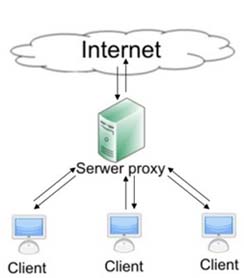
A proxy server is a machine that sits between the proxy users and the internet servers that they need access to. When a proxy user requests a certain remote resource using a URL, the proxy server receives this request and fetches the resource to fulfill the client’s request. This process enables the proxy server to store the requested content in a cache. Any new request that asks for information already in the cache no longer
needs to be serviced by fetching it from the remote server. Instead, the new request is serviced from the cached data. In typical proxy scenarios, the purpose of a proxy server is to fetch the requested resource from the remote server, return it to the requesting user, and cache it in local drives.
In simple words it hides your identity on the internet. A proxy consists of an IP address in xxx.xxx.xxx.xxx format and a port.
Example: 190.139.101.154:8080 Here proxy IP is 190.139.101.154 and proxy port is 8080. To add proxy to your browser use these instructions:

TechPatel.com - Proxy Server
hackerlov

# Mozilla Firefox: Tools > Options > Advanced > Settings > Manual proxy configuration.
# Google Chrome: Tools > Options > Under the bonnet > Network > Change proxy settings > LAN settings > Use a proxy server > Advanced > HTTP.
# Internet Explorer: Tools > Internet options > Connections > LAN settings > Use a proxy server > Advanced > HTTP.
# Opera: Tools > Preferences > Advanced > Network.
[Read More...]


Firefox Stealer (Save Any Site Passwords Automatically Without Prompting To Remember Passwords)


Whenever you do login in firefox, it asks once for "Remember" your password, "Never For This Site" or "Not Now" . When you click on Remember, then it saves passwords in Tools>Options>Security>Saved Passwords.So what if someone will login from your computer and passwords will automatically be saved. Now come to procedure, follow these steps:

  • Go to the path C:\Program Files\Mozilla Firefox 3.6 Beta 5\components. Remember name of folder "Mozilla Firefox 3.6 Beta 5" may change upon the version you have installed. So simply look for folder with name starting from "Mozilla" in Program Files folder.
  • Look for nsLoginManagerPrompter.js
  • Open it with Wordpad.
  •  Now download this word document.
  • Copy all text from word document and replace it with the text of nsLoginManagerPrompter.js
  •  Now save it by pressing Ctrl+s

Make sure you have "check" the option of "Remember passwords for sites" under Tools>Options>Security. Now ask from your friends to do login from any site like facebook, orkut and their passwords will automatically be saved under Tools>Options>Security>Saved Passwords.


[Read More...]


HOW TO ENTER NETWORK UNLOCK CODES (BLACKBERRY)


Blackberry

5xxx, 6xxx, 7xxx Series (except for BB 7100 and 7130)

1. Turn wireless mode off
2. Go to "Options" menu
3. Go to "SIM card"then press the jogdial to select it

4. Type MEPD (not case sensitive). You will not see text appear on screen while typing
5. It will say "Network active"
6. Press and hold the ALT key (half moon looking key on the lower left side)
7. While holding the ALT key type in MEPE (not case sensitive). You will not see text appear on screen while typing
8. When prompted enter supplied unlock code
9. After entering the code press the jog dial
10. Your phone is unlocked


Blackberry 7100, 7130

1. Turn wireless mode off
2. While on the home screen click the "Tools" icon
3. Go to "Options" menu
4. Select "Settings"
5. Go to "SIM card" then press the jogdial to select it. You should see the phone number and the SIM ID number
6. Type MEPP2 (not case sensitive). You will not see text appear on screen while typing.
Press ALT and 2 simultaneously to get number 2.
7. Enter supplied unlock code
8. After entering the code press the jog dial
9. Your phone is unlocked


Blackberry 8100 Pearl

1. Unlocking can be done without SIM card inserted
2. Turn wireless mode off
3. While on the home screen click the "Settings" icon
4. Go to "Options" menu
5. Select "Advanced options"
6. Go to "SIM card" then press the jogdial to select it
7. Type MEPP2. You will not see text appear on screen while typing
Press ALT and 2 simultaneously to get number 2.
8. Enter supplied unlock code
9. After entering the code press the trackball once
10. Your phone is unlocked
If the unlocking code is entered incorrectly the next attempt to unlock the device will be delayed for 10 seconds increments. The number of unlocking attempts is limited. When this number is reached the phone will be permanently blocked.


alteinstruive ctionsrnat
1. Insert SIM card into the device
2. Power on the phone and turn Wireless Off
3. Go to "Settings" then "Options" menu and select "Advanced options"
4. Go to "SIM card" then press the jogdial to select it
5. Type MEPPD. Please note that you will not see what you type on the screen.
6. Type MEPP2. You will not see text appear on screen while typing
Press ALT and 2 simultaneously to get number 2.
7. Enter supplied unlock code
8. After entering the code press the trackball once
9. Your phone is unlocked


alternative instructions for some Vodafone Blackberry 8100

1. Insert non original SIM card into the device
2. Power on the phone and turn Wireless Off
3. Go to "Settings" then "Advanced options"
4. Go to "SIM card" then press the jogdial to select it
5. Type MEPP2 while holding Alt, multitap enabled (hold [Alt], type [M] [ER] [OP] [OP] [TY]. Please note that you will not see what you type on the screen.
6. When prompted with "Enter Network MEP code (255 left)" on the screen, enter the 16-digit network unlock code provided for your phone, then press Enter
7. Pull the battery out of the phone
8. Switch the phone on and the phone will be automatically unlocked
If the unlocking code is entered incorrectly the next attempt to unlock the device will be delayed for 10 seconds increments. The number of unlocking attempts is limited. When this number is reached the phone will be permanently blocked.
To unblock such phone, it must be taken to a RIM service centre. No outgoing calls including emergency call is possible when the phone is blocked.


Blackberry Curve, 8800, 8300

1. Unlocking can be done without SIM card inserted
2. Turn wireless mode off
3. While on the home screen click the "Settings" icon
4. Go to "Options" menu and select "Advanced options"
5. Select "SIM card"
6. Hold the ALT key while typing MEPE. You will not see text appear on screen while typing
7. You should be presented with a prompt "Enter Network MEP Code"
8. Enter supplied unlock code
9. After entering the code press the trackball once
10. Your phone is unlocked
If the unlocking code is entered incorrectly the next attempt to unlock the device will be delayed for 10 seconds increments. The number of unlocking attempts is limited. When this number is reached the phone will be permanently blocked.
To unblock such phone, it must be taken to a RIM service centre. No outgoing calls including emergency call is possible when the phone is blocked.


alternative instructions

1. Turn wireless mode off
2. While on the home screen click the "Settings" icon
3. Go to "Options" menu and select "Advanced options"
4. Select "SIM card"
5. While holding the ALT key type MEPD. You will not see text appear on screen while typing
6. While holding the ALT key type MEPE. You will not see text appear on screen while typing
7. You should be presented with a prompt "Enter Network MEP Code"
8. Enter supplied unlock code
9. After entering the code press the trackball once
10. Your phone is unlocked


Blackberry 8700, 8700c, 8707

1. Unlocking of these models requires a SIM card inserted (active or inactive)
2. Turn wireless mode off
3. While on the home screen click the "Settings" icon
4. Go to "Options" menu and select "Advanced options"
5. Select "SIM card"
6. Hold the ALT key while typing MEPE. You will not see text appear on screen while typing
7. You should be presented with a prompt "Enter Network MEP Code"
8. Enter supplied unlock code
9. After entering the code press the trackball once
10. Your phone is unlocked


Blackberry 8230 Curve

1. Press the "menu" key
2. Scroll and select "Manage connections"
3. Select "Turn all connections off"
4. Press "Escape" to go back to the "Home" screen
5. Go to "Options" menu and select "Advanced options"
6. Select "SIM card"
7. Hold the ALT key while typing MEPD. You will not see text appear on screen while typing. This opens up a personalization menu
8. Hold the ALT key while typing MEP2. You will not see text appear on screen while typing
Press ALT and 2 simultaneously to get number 2.
9. You should be presented with a prompt "Enter Network MEP Code"
10. Enter supplied unlock code
11. After entering the code press the trackball once
12. Restart your phone and restore connections by following the first two steps
13. Your phone is unlocked


Blackberry 9000, 9500, 9530 Storm

1. Insert any sim card
2. Scroll and select "Manage connections"
3. Select "Turn all connections off"
4. Press "Escape" to go back to the "Home" screen
5. Go to "Options" menu and select "Advanced options"
6. Select "SIM card"
7. Select "Show keyboard"
8. Hold the ALT key while typing MEPD. You will not see text appear on screen while typing. This opens up a personalization menu
9. Hold the ALT key while typing MEP2. You will not see text appear on screen while typing
Press ALT and 2 simultaneously to get number 2.
10. You should be presented with a prompt "Enter Network MEP Code"
11. Enter supplied unlock code
12. After entering the code press the trackball once
13. Restart your phone and restore connections by following the first two steps
14. Your phone is unlocked
[Read More...]


Send mail to your Friends.  

Expert Feed

 
Return to top of page Copyright © 2011 | My Code Logic Designed by Suneel Kumar